


You correct your AI once.
We use pnpm, not npm.
It fixes the mistake.
The next day, you start a new session.
It reaches for npm again.
You explain the architecture. Again.
You tell it how you like reports structured. Again.
You remind it which client chose which option. Again.
The strange part is that the model may be far more capable than the one you used six months ago.
Yet you are still repeating yourself.
The problem is not always intelligence.
The problem is memory.

And this is becoming one of the most important layers in practical AI.
Anthropic’s current Claude Code documentation makes the architecture unusually clear: every new coding session begins with a fresh context window. Persistent information has to be carried forward through mechanisms such as human-written CLAUDE.md files or Claude’s own auto-memory.
Claude’s consumer app has been moving in the same direction. In July 2026, Anthropic changed Claude memory into categorized entries that Claude can read and update during conversations.
The shift is easy to miss.
For years, we obsessed over the model.
The next useful question is:
What does the model know about you before the work begins?
A smarter model still starts with what you give it
There is an important distinction here.
A language model does not automatically carry your entire previous working history into every new task.
Something outside the model has to provide the relevant context.
That may be:
a conversation history,
a saved memory,
a Markdown file,
a project database,
a vector store,
a retrieved document,
or an application that decides what past information should be brought back.
One simple local chatbot described in the research for this article demonstrates the basic trick perfectly: it saved conversation history to a JSON file, reloaded that history, rebuilt the prompt and sent the combined context back to a locally running model.
That works.
Until the history becomes enormous.
Then you hit the real memory problem.
Remembering everything is not the same as retrieving the right thing.
A 10,000-page transcript may technically contain the answer you need.
It is still a terrible memory system.
The real upgrade is selective memory
Think about the information you want an AI to carry forward.
Some things should almost always be available:
how you work
important rules
project conventions
recurring commands
decisions that should not be reopened every morning
Other information should only appear when relevant:
an article you read six months ago,
a conversation about one client,
meeting notes from a particular project,
research on a specific technology,
or a decision made during an earlier phase of work.
This is why useful AI memory eventually splits into different layers.
The first is instruction memory.
These are the stable rules.
The second is experience memory.
These are things learned while working.
The third is retrieval memory.
This is the larger body of information that should remain outside the immediate prompt until it becomes relevant.
And the fourth is action memory.
This is where stored knowledge resurfaces at the moment it can actually help you.
That last layer is what turns a database into an assistant.
A second-brain system examined for this article used exactly this idea in practice. Articles, newsletters, Kindle highlights, transcripts and other material flowed through an n8n pipeline, were summarized and tagged, converted into embeddings, stored and later queried conversationally.
Instead of searching for an exact title, the user could ask for an idea they vaguely remembered and retrieve conceptually related material.
That is a much more useful definition of memory.
Not:
Store everything forever.
But:
Bring back what matters when it matters.
Build the smallest version in ten minutes
You do not need a vector database to feel the difference.
Create a file called:
AI-MEMORY.md
Put this inside:
# AI MEMORY

## Working Rules
- Rules the AI should consistently follow.

## Current Projects
- Active project
- Objective
- Current status
- Important constraints

## Decisions Already Made
- Decision
- Date
- Why we made it
- What would justify changing it

## Important Context
- Terms
- People
- Products
- Systems
- Information that repeatedly matters

## Things We Learned
- Durable corrections
- Useful discoveries
- Recurring mistakes to avoid

## Do Not Store
- Passwords
- API keys
- authentication secrets
- unnecessary sensitive personal data
At the beginning of an important session, make this file available to the AI.
At the end, do not tell it simply:
Remember everything from today.
Use this instead:
Review today's work.

Identify only information that would be genuinely useful in a future session.

Separate it into:

RULES
DECISIONS
PROJECT UPDATES
LESSONS LEARNED

Do not store temporary conversation details.

Do not store passwords, credentials, secrets or unnecessary sensitive information.

Do not modify the memory yet.

First show me the exact additions, changes and deletions you recommend.
Review the proposed changes.
Then update the file.
You have just created primitive persistent memory.
No special model required.
But do this for a few months and another problem appears.
Your memory file becomes a landfill.
Old instructions remain.
Decisions change.
Projects end.
Two rules contradict each other.
Useful knowledge gets buried underneath information that should have disappeared months ago.
That is the point where a file stops being enough.
The more interesting system begins here.
A reliable AI memory needs a lifecycle:
CAPTURE → DISTILL → STORE → RETRIEVE → ACT → REVIEW
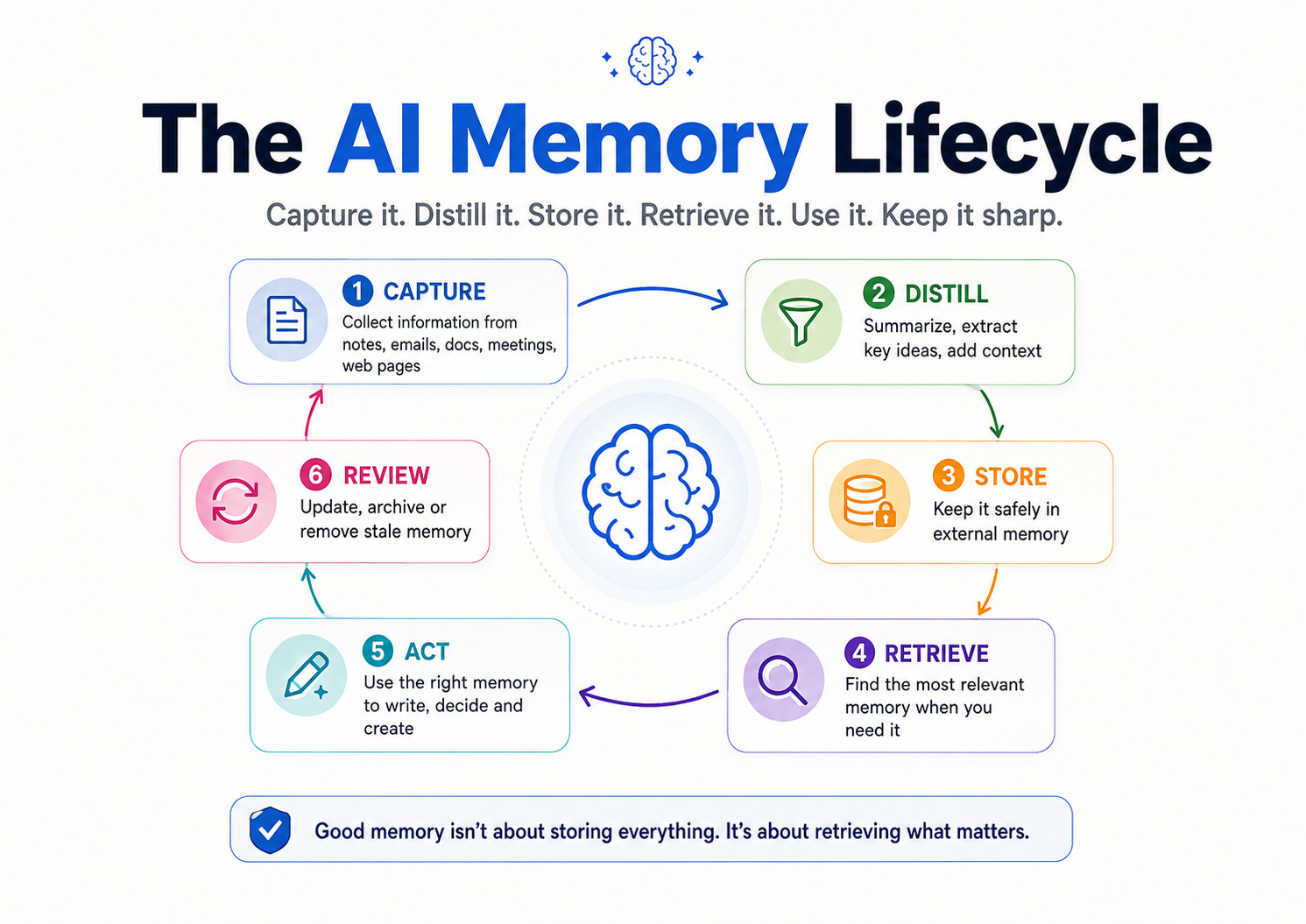
Build the Full Memory System
The six-stage loop solves a different problem at every step.
Skip one, and the quality eventually degrades.
1. CAPTURE: Give memory an easy entrance
Your system cannot remember information that never reaches it.
But capture cannot become another administrative job.
One of the personal-memory systems studied for this article pulled information from browser activity, saved articles, newsletters, Kindle highlights, physical-book OCR, transcripts and social posts into one processing pipeline.
You do not need all of that on day one.
Start with three inputs:
Work
Meeting notes, decisions, project updates.
Knowledge
Articles, reports, papers, useful documents.
Personal instructions
Preferences, corrections and recurring ways you want AI to work.
For every captured item, keep basic metadata:
SOURCE:
DATE:
PROJECT:
TYPE:
WHY THIS MATTERS:
The last field is surprisingly valuable.
Ten months later, the system should not only know what you saved.
It should know why you cared.
2. DISTILL: Never make raw information your memory
A folder containing 5,000 documents is storage.
It is not memory.
Before long-term storage, turn raw material into something easier to retrieve.
For a useful article, for example, keep:
TITLE
SOURCE
DATE
3-SENTENCE SUMMARY
KEY IDEAS
IMPORTANT FACTS
MY NOTES
PROJECTS THIS MAY HELP
For a meeting:
MEETING
DATE
PEOPLE
DECISIONS
ACTION ITEMS
OPEN QUESTIONS
PROMISES I MADE
PROMISES OTHERS MADE
This is where AI earns its place.
It can do the mechanical extraction while you decide what deserves to survive.
3. STORE: Separate rules from knowledge
Do not throw everything into one giant memory file.
Use two stores.
Store A: always-on memory
Keep it small.
This contains rules, preferences, active constraints and the few pieces of context that should appear repeatedly.
Store B: retrievable memory
This contains the large archive:
research,
documents,
meeting history,
finished projects,
articles,
notes,
transcripts,
past decisions.
The second store should normally stay outside the immediate context.
You retrieve from it when needed.
That distinction matters because context is limited and attention is valuable.
Anthropic currently recommends keeping individual CLAUDE.md files under roughly 200 lines because oversized instruction files consume more context and can reduce adherence.
The same principle applies beyond coding:
Permanent context should be scarce.
4. RETRIEVE: This is where memory becomes intelligent
Keyword search asks:
Which files contain these words?
Semantic retrieval asks:
Which stored information means something similar to what I need now?
That is the purpose of embeddings.
An embedding converts text into a numerical representation designed to preserve aspects of its meaning. Similar pieces of information can then be found even when the wording is different. OpenAI and Ollama both document embeddings for semantic search and retrieval, while n8n supports vector-store retrieval inside AI workflows.
The architecture becomes:
QUESTION
   ↓
CREATE SEARCH REPRESENTATION
   ↓
SEARCH MEMORY
   ↓
RETURN MOST RELEVANT ITEMS
   ↓
ADD THEM TO CURRENT CONTEXT
   ↓
MODEL ANSWERS
This is the basic idea behind retrieval-augmented generation, or RAG.
The important word is not generation.
It is retrieval.
Your AI does not need your entire history.
It needs the right five pieces of your history.
A practical advanced stack
You can build this visually with an automation tool such as n8n.
A useful pipeline looks like:

INPUT
Email / Document / Article / Notes / Transcript
        ↓
CLEAN
Extract useful text
        ↓
DISTILL
Summary + tags + metadata
        ↓
EMBED
Convert meaning into vectors
        ↓
STORE
Vector database + source metadata
        ↓
RETRIEVE
Find relevant memories
        ↓
ANSWER
LLM uses retrieved context
        ↓
WRITE BACK
Save durable new learning
n8n currently supports AI workflows with multiple model providers, memory components, embeddings and vector stores.
The exact vendor matters less than the architecture.
For a cloud build, use a vector store and your preferred model provider.
For a more local setup, Ollama can generate embeddings locally as well as run local models, although the database and surrounding workflow still need to be designed properly.
5. ACT: Memory should appear before you ask for it
This is the stage most “second brains” never reach.
Searchable notes are useful.
Proactive memory is better.
Imagine tomorrow’s 10:00 AM meeting appears on your calendar.
At 9:45, your system retrieves:
the last meeting,
the decisions,
the open questions,
the email thread,
the promise you made,
and the document the client sent.
Then it produces:
MEETING BRIEF

Last decision:
Move forward with Option B.

You promised:
Send revised cost estimate.

Still unresolved:
Deployment date.

New since last meeting:
Client sent updated requirements Monday.

Ask today:
Does the revised timeline still work?
You did not search your memory.
Your memory arrived when it became useful.
Other obvious outputs are:
daily briefs,
weekly project reviews,
unanswered commitments,
related research when you start writing,
or previous decisions when someone tries to reopen an old debate.
The research on AI second brains repeatedly points toward this transition from passive storage to active retrieval and output.
6. REVIEW: A memory needs a delete button
This may be the most important stage.
Most people assume better memory means storing more.
Eventually the opposite becomes true.
A useful review asks:
Which memories are now outdated?

Which rules conflict?

Which completed projects should move to archive?

Which information has not been useful for six months?

Which details are unnecessarily sensitive?

Which long entries can become short summaries?

Which repeated memories can be merged?
Then prune.
The goal is not an AI that literally remembers every byte forever.

The goal is an AI that stops forgetting what matters without becoming buried in what does not.
For Claude Code users: the one-file version is now surprisingly powerful
Developers can implement the first layers almost immediately.
Anthropic currently supports several scopes of persistent instructions:
~/.claude/CLAUDE.md for personal instructions across projects,
./CLAUDE.md or ./.claude/CLAUDE.md for project instructions,
and ./CLAUDE.local.md for personal project-specific context.
Run:
/init
Claude analyzes the project and creates a starting CLAUDE.md.
Then edit aggressively.
Keep what Claude would otherwise get wrong.
A useful file might be:
# Project

Next.js application using PostgreSQL.

## Commands
Install: pnpm install
Test: pnpm test
Lint: pnpm lint

## Rules
- Use named exports
- TypeScript strict mode
- Never modify production data
- Add tests for every bug fix

## Architecture
- API routes live under /src/api
- Database access uses repository classes

## Before finishing
- Run tests
- Run lint
- Report any failure
Claude Code also supports @path/to/file imports for additional instruction files and auto-memory for learnings Claude decides are worth carrying into future sessions. /memory lets you inspect and manage memory, while /context shows what actually loaded.
For teams using several coding agents, AGENTS.md is worth knowing.

The open format is now used by more than 60,000 open-source projects and is designed as a predictable instruction file for coding agents. The project documents compatibility across a growing ecosystem of tools rather than tying the instructions to one vendor.
That gives developers a useful separation:
AGENTS.md
Shared cross-agent project instructions

CLAUDE.md
Claude-specific project instructions

AUTO MEMORY
Things Claude learns while working

README.md
Human documentation
One critical warning:
memory instructions are guidance, not security controls.
Anthropic explicitly notes that CLAUDE.md content shapes behaviour but is not an enforced configuration layer. If an action must be blocked, use permissions, sandboxing, hooks or another enforcement mechanism.
Never write:
Do not delete production data
and assume the sentence is equivalent to technical prevention.
It is not.
Five mistakes that quietly destroy AI memory
1. Saving everything
More memory creates more noise.
Store durable information, not transcripts of your entire existence.
2. Never updating decisions
Old truth can be worse than no memory.
Attach dates and status to decisions that may change.
3. Letting contradictions accumulate
If one memory says “use npm” and another says “use pnpm,” you have built confusion that persists.
4. Treating retrieval as perfect
A fact can exist in storage and still fail to be retrieved.
Test important workflows with questions whose answers you already know.
5. Storing secrets because the system feels private
Memory increases usefulness precisely because information persists.
That makes data discipline more important, not less.
Research into machine unlearning shows why deletion and memorization become difficult once sensitive information is deeply incorporated into trained systems.
External memory has an important advantage here: files, databases and vector-store records can be designed to remain visible, auditable and removable rather than being baked into model weights.
That does not eliminate privacy risk.
It gives you a much clearer place to control it.
Build yours tomorrow
Do not begin with Pinecone, five agents and twelve automations.
Tomorrow, do this:
First 10 minutes
Create AI-MEMORY.md.
Add your recurring rules, one active project and three decisions.
Next 10 minutes
Use it in a fresh AI session.
Ask questions that require the stored context.
See what it retrieves correctly.
Final 10 minutes
Run the end-of-session memory review.
Approve only the durable updates.
If that simple loop saves you from repeating yourself, you have proven the value.
Only then add automation.
Only then add embeddings.
Only then add RAG.
Only then make the system proactive.
Because memory compounds.
Every useful correction you preserve is one correction you should not have to make again.
Every decision you retain is one decision you should not have to reconstruct.
Every piece of research you can retrieve is information you no longer need to hunt for from zero.
The smartest AI model in the world is still limited by the context it receives.
Give it better memory and the same model begins to feel different.
But the final lesson is almost the opposite of the title.
The best AI is not one that remembers everything.
It remembers what matters, retrieves it at the right moment, and knows what should be forgotten.
If this kind of practical AI build is useful, share it with someone who is still repeating the same instructions to their AI, and subscribe to Think AI for more systems you can actually put to work.
I am using the same mnemonic matrix since 2023 and it works flawlessly, even with no updates. All you need is a local sql db, vector dbs, rag pipeline with semantic layer and good parsers, mappers and labeling, and an embeddings model, even like 100-200 M range from meta, IBM, Google etc. Glue these together correctly and you cam have a memory that spans years accurately, can provide proactive insights, and structure the future based on past.
YESSSSSSS!!!!!!!!!!!!!!!!!
PERSISTENT MEMORY SYSTEMS!